A 12 GB gaming card runs FLUX.2 klein 4B locally and returns a 1344×896 frame in 24–42 seconds, with no subscription and nothing leaving the machine. It is genuinely good at rooms, landscapes, objects and creatures, and bad at small text, icons, close-up faces and named authored styles — no setting fixes that, because it is the size of the model talking, not your setup. What follows is a field report from several hundred frames on one card: what came out as junk first, why, and the rules that stopped it.
There are dozens of installation guides. This is not one of them. Getting the thing running took an evening; getting it to produce frames worth keeping took three weeks and a lot of deleted output. The second part is what nobody writes down.
The card, the stack, the numbers
RTX 4070 Super, 12 GB of VRAM. Forge Neo, installed through Pinokio, running as a local server with an API on the same machine — which matters, because once there is an API you can drive it from a script instead of clicking a button four hundred times.
On VRAM the official sources disagree, which is worth knowing before you buy anything. The klein 4B model card says the model "fits in ~13GB VRAM" and names RTX 3090/4070 and above; the official inference repo says ~8 GB. Both are Black Forest Labs. The gap is precision, not marketing: full precision wants the larger figure, an FP8 or quantised checkpoint fits the smaller one. On 12 GB it runs all day without a single out-of-memory stop. The 9B variant is the one that does not fit, so on this hardware the choice is made for you.
The klein 4B weights are Apache 2.0, unusually permissive for an image model. FLUX.2 dev ships under a different, non-commercial licence — if money is involved, read the licence file that came with your exact checkpoint, not a forum post.
Working settings
These are the values that survived. Each one was arrived at by a frame coming out wrong.
| Setting | Value | Why this and not the default |
|---|---|---|
| Preset | flux | Not klein. That preset drops the step count to 4 — the distilled schedule — and on a non-distilled checkpoint frames come out visibly unfinished |
| Sampling steps | 28 | Below ~20 surfaces go mushy; above 30 nothing improves and the frame just costs more seconds |
| CFG Scale | 1 | The real guidance lives in the next row; raising this one burns the colours |
| Distilled CFG | 3.5 | Higher makes the image obey the words and look like plastic; lower makes it pretty and off-brief |
| Sampler | Euler | Predictable. Exotic samplers changed the frame without improving it |
| Scheduler | beta | Cleanest edges of the ones tried |
| CLIP skip | 1 | There is no CLIP in FLUX.2 to skip. A value of 2 is a leftover from the SD preset |
| Frame size | 1344×896 | Sides must be multiples of 16, total up to about 2 megapixels. Odd numbers produce seams at the edge |
| Time per frame | 24–42 s | Measured on this card at this size. Ten variants is a coffee, not an afternoon |
One thing in the interface to ignore completely: the 75-token counter. It is furniture from the CLIP era and it does not describe what this model reads.
The first batch was junk, and the reason was in the encoder
Our first prompts were briefs. Real ones, the kind you would send a layout designer: "leave free space at the top for a headline", "no captions", "each zone takes a third of the picture". Every frame came back wrong, and not wrong in an interesting way — wrong like a photocopy of nothing.
The reason is architectural. FLUX.1 read prompts through a CLIP plus T5 stack. FLUX.2 dropped both and uses a single Mistral-Small-3.2-24B-Instruct vision-language model as its text encoder. That is an instruction-tuned language model trained on prose. Hand it a designer's brief and there is nothing in it to draw: a brief describes a page, and the model is trying to photograph a room.
Everything below follows from that one fact.
Rule 1: describe a scene, not a task
Write what a camera in that room would see. Not what the file needs to do afterwards.
What we sent first, and what it deserved:
Interior of a modern kitchen, leave free space at the top for a headline,
no text, no captions, honest worn textures, lived-in feel,
faint marks near the skirting, each zone takes a third of the picture
What actually works, same room:
One single continuous photograph of one [KITCHEN IN A CITY FLAT].
[Pale oak fronts to the ceiling, a stone worktop, a linen runner
crumpled on the island, three pots of herbs by the sink.]
Cold morning daylight from the window on the left meets the warm strip
of an LED under the wall units. Flat evenly painted ceiling in flawless
condition. The room is noticeably wider than the furniture.
Shot on 24mm at f/8, sharp focus throughout.
Seventy words. Every one of them is a thing light can land on.
Rule 2: there are no negative prompts. At all.
This is the single most expensive misunderstanding for anyone arriving from Stable Diffusion. The Black Forest Labs prompting guide states it flatly: FLUX.2 does not support negative prompts, and using them can add exactly the thing you were trying to avoid. There is no field, no --no, no weighting trick. There is only description.
So "no text" does not forbid text. It puts the word text into a prose stream read by a language model, and the model, reasonably enough, makes the scene a bit more textual. Same with "no blur", "no people", "no clutter".
Every ban has to be rewritten as a state of the world:
- not "no blur" → "sharp focus throughout"
- not "no text on the packaging" → "plain undecorated ceramic"
- not "no people" → "the room is empty", or simply describe the room and never mention people
- not "don't crop the chair" → "the whole chair is inside the frame with floor visible beneath it"
The general shape: name the end state, never the thing you fear.
Rule 3: length has a ceiling, and it is lower than you think
The prompting guide puts the usual working range at 30–80 words, with 80-plus reserved for genuinely intricate scenes. We did not believe it. We wrote a 2189-character prompt for a single interior, full of caveats and clarifications, and got three consecutive frames that had nothing to do with each other or with the request. Cut to 983 characters, same scene, same seed range: right on the first try.
A long prompt is not a detailed prompt. It is one where the important sentence is buried among twelve unimportant ones and the encoder cannot tell which is which. Even an elaborate invented creature has fit into 900–1000 characters every time.
The discipline: after writing, delete every sentence that does not change a pixel. "Highly detailed", "masterpiece", "8k", "professional" — none of those change a pixel.
Rule 4: JSON prompting, for anything that has to be a series
For one-off frames prose is fine. For a set that has to look like one set — eight previews for one page, twelve rooms for one flat — prose drifts. The guide's structured format solves it, and the schema is worth memorising: scene, subjects, style, color_palette, lighting, mood, background, composition, camera.
{
  "scene": "[a small kitchen in a city flat, ordinary weekday morning]",
  "subjects": [
    {"description": "[a crumpled linen runner on the stone island]",
     "position": "[centre foreground]"}
  ],
  "style": "[interior photograph]",
  "color_palette": "[pale oak, warm grey stone, muted green]",
  "lighting": "[cold daylight from the left window meeting a warm LED strip]",
  "mood": "[calm, unstaged]",
  "background": "[flat evenly painted ceiling in flawless condition,
                  a plain wall with one shelf set deep into the room]",
  "composition": "[one single continuous photograph of one room,
                   the room noticeably wider than the furniture]",
  "camera": {"lens": "[24mm]", "depth_of_field": "[f/8, sharp focus throughout]"}
}
The value is not tidiness. It is that you can change one block — lighting to evening, camera to 85mm — and get a frame that belongs to the same series instead of a new invention. Rewriting a prose paragraph always changes three things you did not mean to change.
Rule 5: realism comes from light, not from wear
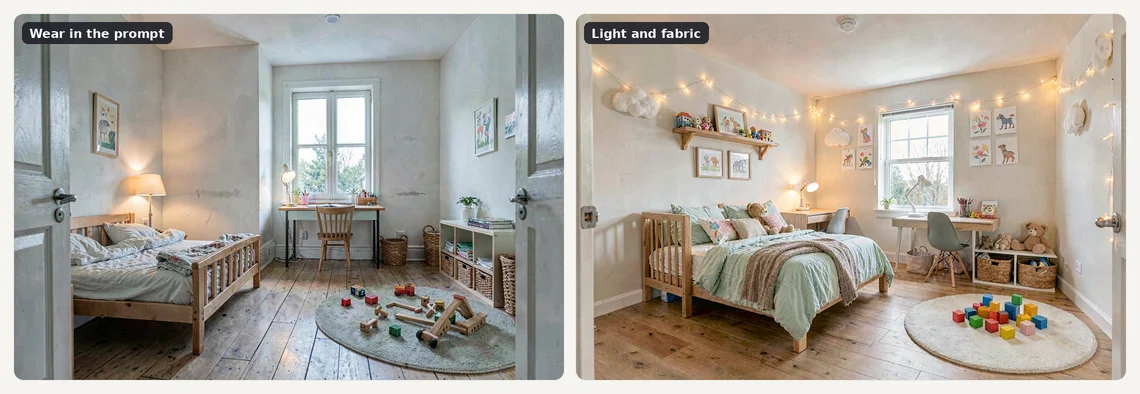
This one cost us a week. Wanting rooms that looked lived in rather than showroom-clean, we wrote "honest worn textures", "lived-in", "faint marks near the skirting". What came back was not life. It was an abandoned flat: peeling paint, damp stains, a skirting board that had lost an argument. Ask a model for wear and it gives you decay, because in its training data those words sit next to photographs of ruins.
What actually reads as a real photograph of a real room:
- Two light temperatures in one frame. Cold daylight from a window meeting warm lamplight indoors. This one move does more than every "photorealistic" tag ever written.
- Crumpled fabric. Linen that has been sat on. A towel not folded at right angles.
- Living plants — real ones, in a pot, slightly asymmetric.
- Honest optics. 24mm at f/8 for a room, 85mm at f/2 for a portrait. A named lens sets perspective and depth of field at once, and fake images get both wrong.
And two lines that sound absurd until you have seen the alternative: state the ceiling and state the walls. Without "flat evenly painted ceiling in flawless condition" the model paints streaks across it, every time. And a wall left undescribed reads as an unfinished renovation — grey, patchy, mid-plaster. The model has no concept of "just a normal ceiling". Say it out loud.
Rule 6: it cannot count, and it does not know where the frame ends
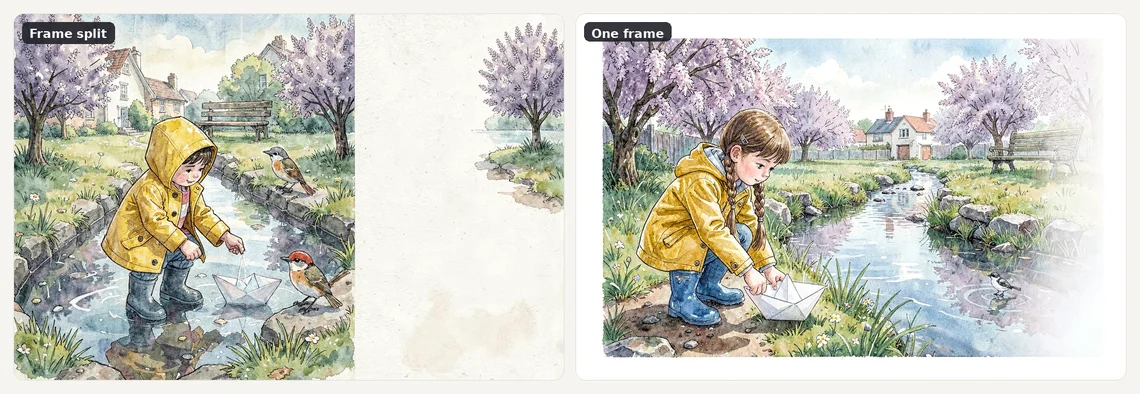
Two failures that look unrelated and have the same cause.
Numerals get ignored. "Two sun loungers" reliably produced three to five. A count only survives when isolation enforces it: exactly two loungers with a wide strip of empty decking between them and the edge. Give the number somewhere to be visible and it holds; state it as a fact and it dissolves.
Words about parts of the frame produce montages. "Each zone takes a third of the picture" gave us a triptych with white dividers painted in. "Generous margin at the left and right edges" gave a diptych. The model reads "part of the frame" as "part of a composite image", because that is what those words label in its training data.
The fix for both: express layout as a property of the world, not of the picture. Instead of asking for margins, write one single continuous photograph of one room plus the room is noticeably wider than the furniture. You get the margin, inside one photograph.
Rule 7: describe a hybrid by body zones, never by swapped parts
We wanted a creature with a bird's head on a cat's body. "A beak instead of a muzzle" produced, four times running, a beak pasted on top of a cat's jaw. Two mouths. Every time.
The phrasing that worked treats the animal as continuous territory:
One single creature, one continuous body.
From the neck up it is entirely a [RAVEN]: black beak, black feathered head,
one dark eye in profile.
From the shoulders down it is entirely a [LYNX]: tawny fur, heavy forelegs,
a long tail low to the ground.
Standing on a wet rock in cold overcast light, 85mm at f/2.8.
"Instead of" invites the model to keep both. "From the neck up / from the shoulders down" gives it a boundary and one animal on each side of it.
Rule 8: pseudo-text, the failure you will not see at full view
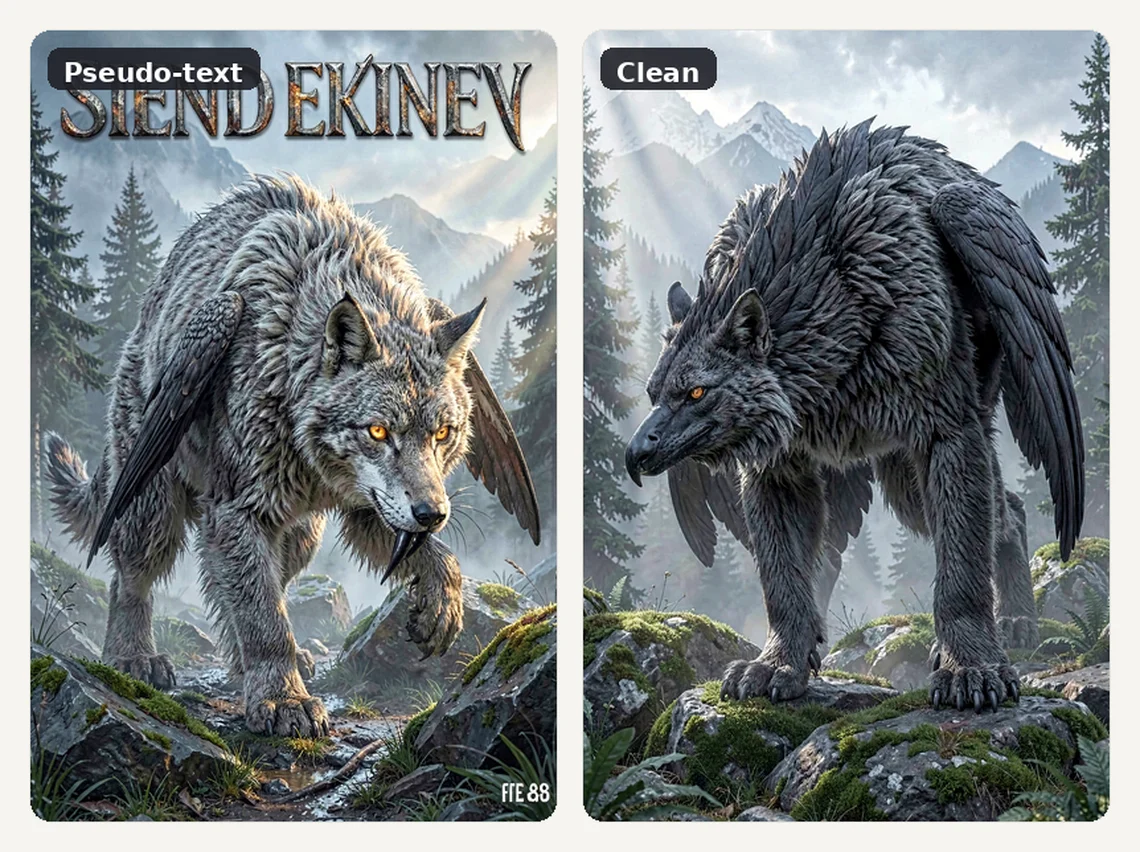
The model writes letters wherever an object implies text, and the letters are always nonsense. The klein 4B model card says as much in its own limitations: text the model outputs "may be inaccurate or subject to distortion".
Every source we actually caught, in order of how sneaky they were:
- book spines anywhere near the foreground
- monitor and phone screens
- posters, framed prints, packaging
- shop signage visible through a window
- badges and control panels on appliances
- the word "catalogue" appearing in a style description — it hung a price tag on a chair
- "book cover" — a headline across the top reading SIEND EKINEV
- "space for the title and author name" — produced ESTINTIDB DONIIE
- "oil painting, 19th century" — the model signed the canvas in the corner
The last three are the important pattern: naming a medium summons the furniture of that medium. Say "book cover" and you get a title. Say "oil painting" and you get a signature. Name the kind of image instead — "a portrait in thick visible brushstrokes" — and the letters never appear.
The rest of the fixes are physical: move shelving into the depth of the room where spines are unreadable anyway, write "screens dark and switched off", ask for "plain undecorated ceramic", and put foliage outside the window instead of a street.
The process, without which none of the rules hold
Rules produce good frames. Process is what stops bad frames reaching anyone.
A critic gate on every frame. Each image gets checked against the text of the task, answering exactly one question: does this show what was promised? Not "is it nice". We skipped this step once, on a deadline, and shipped 57 previews that had to be redone. The check itself can be a language model with vision, given the task text and the image:
Task text: [PASTE THE ORIGINAL TASK]
Look at the image and answer one question: does it show what the task promised?
List every mismatch as a separate line, using only these categories:
 - substituted subject (the wrong thing is in the frame)
 - an object cut off by the edge of the frame
 - letters, digits or writing anywhere in the image
Do not comment on beauty, style, colour or taste.
If there are no mismatches from that list, reply PASS.
Crops are not optional. Pseudo-text is invisible at full view. The price tag that survived our first review was 30 pixels wide in a 1344-pixel frame. Look at the corners at 100%, or you are not looking.
Know what is not grounds for rejection. This is what keeps a batch from running forever. A rug with a longer pile than asked, cabinets stopping two centimetres short of the ceiling, one lounger more than requested on a wide deck — keep them. Reject only for a substituted subject, an object cut off by the frame edge, and pseudo-text. Widen that list and regeneration never converges: you chase perfection through forty frames and end up using the third one.
Diagnosing a blowout. If a frame comes back not merely wrong but completely unrelated — you asked for a kitchen and received a forest — do not start rewriting the prompt. Check three things in order: the prompt JSON is still valid, the loaded checkpoint is the one you think it is, and VRAM is not being shared with something else. Then run a short control at 512×512:
a red ceramic mug on a white table, daylight from the left, sharp focus
If the mug comes out as a mug, the model and the checkpoint are fine and the problem is in your text. If the mug is also nonsense, the problem is below the model. Ours coincided exactly with a graphics driver reinstall.
One more from the guide, easy to miss: prompt culturally specific subjects in their own language. Black Forest Labs states that native-language prompting gives more culturally accurate results — local markets, architecture and atmosphere land closer to the real thing. Which follows naturally from a 24B instruction-tuned encoder that speaks more than English.
Honest numbers from three batches
Across three batches of ten previews, the split came out the same every time: six frames usable on the first attempt, three on the second, one needing a third. That is the realistic shape of a session — not "one prompt, one masterpiece", and not "fifty rerolls".
The outlier worth reporting: one child's room took seven attempts. Small furniture, a lot of small objects, and every one of them an invitation to pseudo-text on a toy box. Rooms full of small labelled things are the hardest case on this hardware.
What this card genuinely cannot do
No prompt fixes any of these. They are properties of a 4B model.
- Fine graphics, icons, logos, small ornament. Anything needing crisp geometry at small scale comes out approximated. Comparisons of the 4B against the 9B say it in gentler words: the larger model holds fine detail, the 4B smooths it over.
- Convincing close-up faces. Mid-shot and further is fine. Fill the frame with a face and the skin goes waxy and the eyes go slightly wrong. This is the clearest gap against paid services.
- Readable text in the image. Not "difficult" — treat it as unavailable and design around it.
- Recognisable authored styles. The model knows genres, not signatures. Asking for a specific living artist by name is both unreliable here and a habit worth dropping anyway.
- The same character across many frames without feeding a reference image back in. Prose alone will not hold a face steady.
Where local wins and where it loses
Plainly, without the sales pitch. Local generation is not a replacement for Midjourney and saying otherwise would be dishonest.
It wins on: cost, once the card is already in the machine — no per-image price, no monthly bill. Iteration speed, because 30 seconds and no queue changes how you work: you try the stupid idea, because trying it is free. Privacy, because a client's floor plan never leaves the desk. Control, because you own the checkpoint, the settings and the seed, and nothing changes under you overnight when a service updates its model.
It loses on: faces, fine detail and text, all three decisively. Setup time — an evening minimum, and driver updates will eventually cost another one. Peak quality on a hero image that will be looked at closely. And convenience: no phone app, no gallery, no sharing, no undo.
The split we settled on: local for volume, drafts, backgrounds, textures, interiors, anything where the frame is one of forty. Paid services for the single image that has to carry a page.
One honest note on freedom. Nothing is sent to a server, so nothing is refused by a moderation layer you cannot see, and a horror scene or a client's own branding does not have to argue its case. That is a workflow benefit, not a permission slip: the licence on the weights and the law where you live apply exactly as before.
FAQ
Will FLUX.2 klein run on 8 GB of VRAM?
Officially, sources differ: the klein 4B model card cites about 13 GB and names RTX 3090/4070 and up, while the inference repo says roughly 8 GB. The difference is precision. On 8 GB you will need an FP8 or quantised checkpoint and should expect slower frames and more memory management. On 12 GB the full checkpoint runs comfortably at 1344×896 with no offloading.
Why does my image contain letters when I asked for no text?
Because FLUX.2 has no negative prompts, and the phrase "no text" simply puts the idea of text into the description. Delete every ban from the prompt, then remove the objects that imply writing: move bookshelves into the depth of the room, switch screens off, ask for plain undecorated packaging, and put foliage outside the window rather than a street with signage.
Is 28 steps not wasteful on a model advertised as four-step?
It depends which checkpoint you loaded. The distilled klein variants are built for a 4-step schedule and get worse, not better, if you push the count up. The non-distilled base variant takes a configurable step count, and that is where 28 belongs. If your frames look overcooked at 28, you are on a distilled checkpoint and should drop to its intended schedule.
Can I use what the card generates commercially?
The klein 4B weights are released under Apache 2.0, which permits commercial use. FLUX.2 dev is a different, non-commercial licence. Since checkpoints get repackaged, quantised and renamed as they travel, the only reliable answer is the licence file that shipped with the exact file you downloaded. Read that, not a forum thread.
Should I stop paying for an image service and go local?
Only if your work is volume work. Local generation wins on cost, iteration speed and privacy, and loses clearly on close-up faces, fine detail and any text inside the frame. If you produce forty backgrounds a week, a card you already own pays for itself. If you need one flawless hero image a month, a subscription still does that better.